Best AI website builders for subscription stores
You know what makes your subscription worth joining: the products, the experience and the brand behind it. Getting that idea into a store can be harder. When the layout or purchase flow you want goes beyond a template's controls, making it yours can become a custom development project.
For subscriptions, that fit goes beyond the homepage. Customers may need to choose a delivery frequency, add a one-time purchase or manage their next shipment. The design has to make those choices clear and connect them to the right recurring offer.
AI website builders open a new route: a store shaped around your brand, with the design work handled through prompts. You can make supported changes yourself and reduce the custom development you need to commission.
This guide compares five options, covering what they build, how subscriptions connect and what you will manage after launch, so you can choose the right fit for your business.
Quick takeaway: Start with Subbly for a distinctive store built within a subscription-first platform. Shopify pairs native AI with its commerce system; Lovable suits a separate custom storefront connected to a chosen backend. Wix and Squarespace can suit broader sites with simpler recurring-selling needs.
Which option fits your subscription store?
|
Route |
Best fit |
AI building approach |
Main tradeoff |
|---|---|---|---|
|
Subbly |
A unique subscription-first store built around your brand |
Build storefronts and products within Subbly, with eligible checkout and portal customization |
Metered credits; custom experiences have plan and access conditions |
|
Shopify |
Existing Shopify or broader commerce needs |
Generate themes and blocks inside Shopify's theme system |
Theme constraints remain; subscriptions need a suitable app |
|
Lovable |
A custom storefront with a chosen commerce backend |
Prompt-led design with a separate commerce connection |
Builder costs plus integration work and upkeep |
|
Wix Harmony |
A mixed-purpose site with visual editing |
Chat with Aria and adjust pages directly in the editor |
Manual mobile edits; Stores subscriptions cover physical products |
|
Squarespace |
A content-led site with simple recurring sales |
Guided AI templates and later chat where available |
Chat rollout conditions and narrower subscription checkout controls |
Subbly publishes this guide and is one of the options compared. Recommendations are based on official documentation reviewed on November 17, 2026. This is a documentation-based comparison, not a hands-on head-to-head test.
What to look for in an AI subscription-store builder
Use five criteria to compare the building experience:
- Design freedom. Can you shape the pages and buying flow around your brand, or do your ideas need to fit a theme's available sections? This matters when your subscription needs more than a standard product page.
- Later edits. Consider the next banner, page or plan comparison you want to add. Will you describe the change, adjust it in a visual editor or need help with code?
- Subscription fit. The choice on the page must connect to the correct recurring price, delivery frequency and customer controls. A fixed monthly product needs less than a configurable box.
- Work beyond the pages. Look for supported help creating products, preparing offers and working with store records. Check which tasks the built-in agent handles and which need another app or connected assistant.
- Ongoing responsibility. Decide who will keep the site, apps and payment connections working after changes. Include that work, along with software and usage charges, in the decision.
For a straightforward store, use the supported chat and editor controls for pages, then configure products and recurring offers in the commerce tools. Plan for technical help with layouts outside those controls, custom carts or portals, and connections that need code. With a separate storefront such as the Lovable route, agree who will test and maintain the connection to billing and orders.
For a broader comparison of subscription engines and models, use our subscription ecommerce platform guide.
What to prepare before you build
Start with your subscription offer and the pages customers need. Bring any brand assets you already have, such as your logo, product photos or a little copy that sounds like your brand.
If you're still developing the look, ask the builder to help explore colors, fonts and layouts. Reference sites can help you explain what you like. Supply accurate product facts and buying terms, and mark anything undecided.
A coffee club could start with:
Create a homepage, subscription product page and About/FAQ page using any brand notes and photos supplied. Show two roasts to choose from, each at $30 per month. Lead with the coffee, explain the delivery and make the subscription button prominent on phones. Flag missing product facts, shipping terms and checkout connections.
Use the same brief when trying builders, adapting it to their supported prompts, guided questions or upload tools. Compare how well each expresses your idea and how easily you can improve it.
Subbly for a subscription-first store
Subbly is an AI-native subscription commerce platform. Its builder lets you describe your brand and the experience you want, then build and refine it.
You can shape a distinctive storefront that looks like your brand, rather than a template, within the same platform that manages your subscription products.
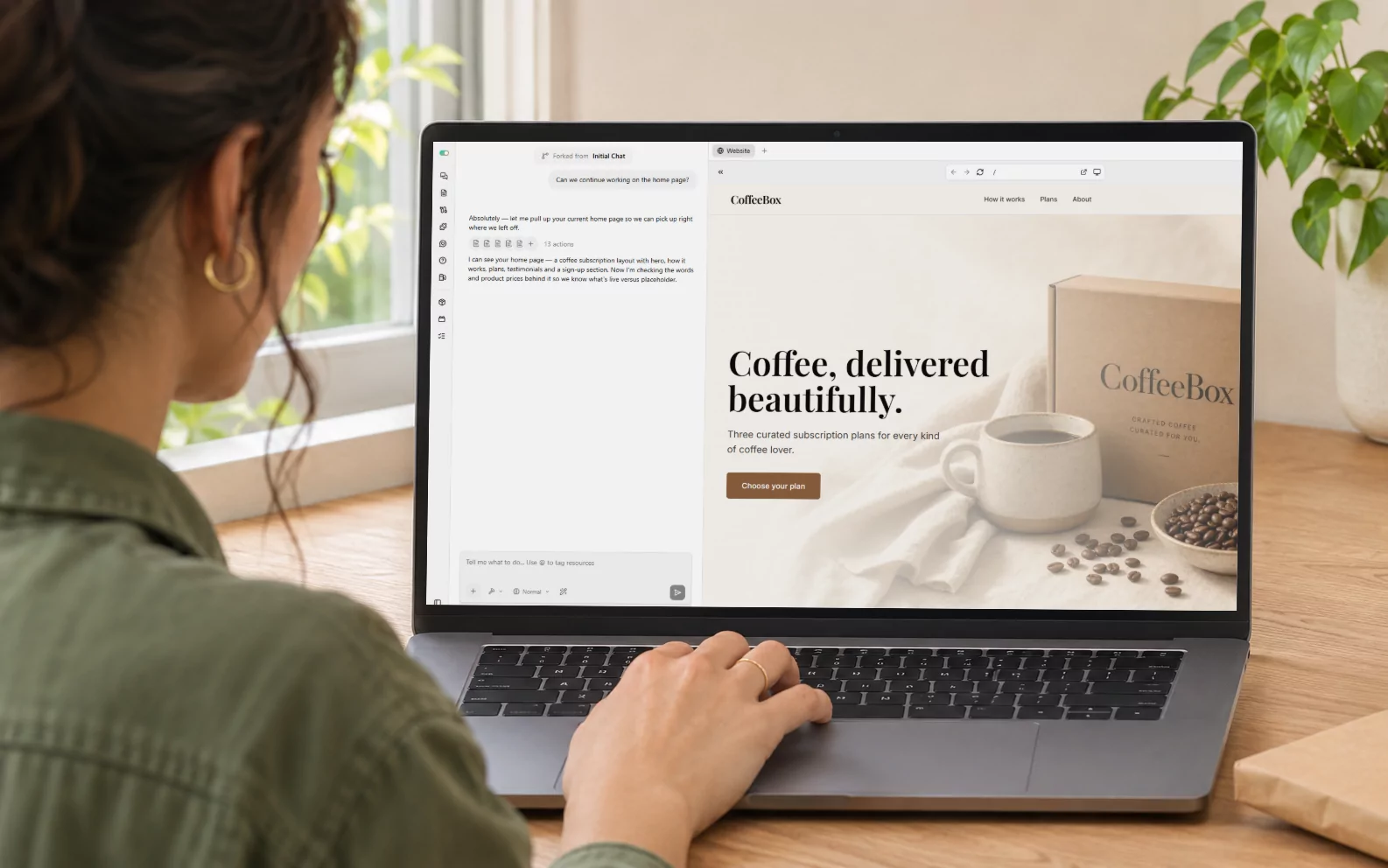
In Subbly's Razor Club demo, the same brand takes three different homepage directions before one is built into the store. You can see how changing the layout changes the brand's character, then how selecting or drawing around part of a page becomes a request for an edit.
For your own store, that means you can work on the overall direction, then refine individual elements. Ask for a different hero layout, select a heading to change its treatment, or point out where a product image should move. The builder's Edit Mode lets you target the part you want to change, so you can keep a layout you like while improving one detail.
You can also preview and prompt for mobile-specific changes. For a coffee-club homepage, you might ask for a smaller heading on phones while retaining the desktop version, then review both views before publishing.

The same agent can create products and coupons in Subbly. You can work on the offer and its storefront presentation in one platform, with the subscription system already connected.
Subbly also provides customer subscription and payment management, with skipping and pausing subject to merchant settings and account conditions. Built-in payment retries and cancellation offers help you recover failed renewals and give customers a reason to stay.
Max adds custom checkout and portal design. The checkout and portal pages still label those experiences early access, so confirm your account's eligibility if that customization is central to the plan.
Choose Subbly when you want a store shaped around your brand and subscription model, with the builder working inside the platform that runs recurring commerce.
Shopify for a broader commerce business
Shopify uses AI to help you get a theme started, then gives you an editor to keep working on it.
You can generate a personalized theme from a business description. For an existing store, current instructions use the mobile app or a mobile browser, with plan and language conditions.
For later changes, Sidekick can generate theme blocks from a description. For the coffee club, you could request a seasonal-roast section with a product image, tasting notes and a subscription button, including instructions for how it should stack on mobile.
Ask for editable image, text and button settings in the prompt. If Sidekick generates those controls, you can adjust the block through the theme editor afterward. Preview it on desktop and mobile, change the settings and use follow-up prompts when the result needs another pass. You can also edit the generated code if you have the skills or developer help.
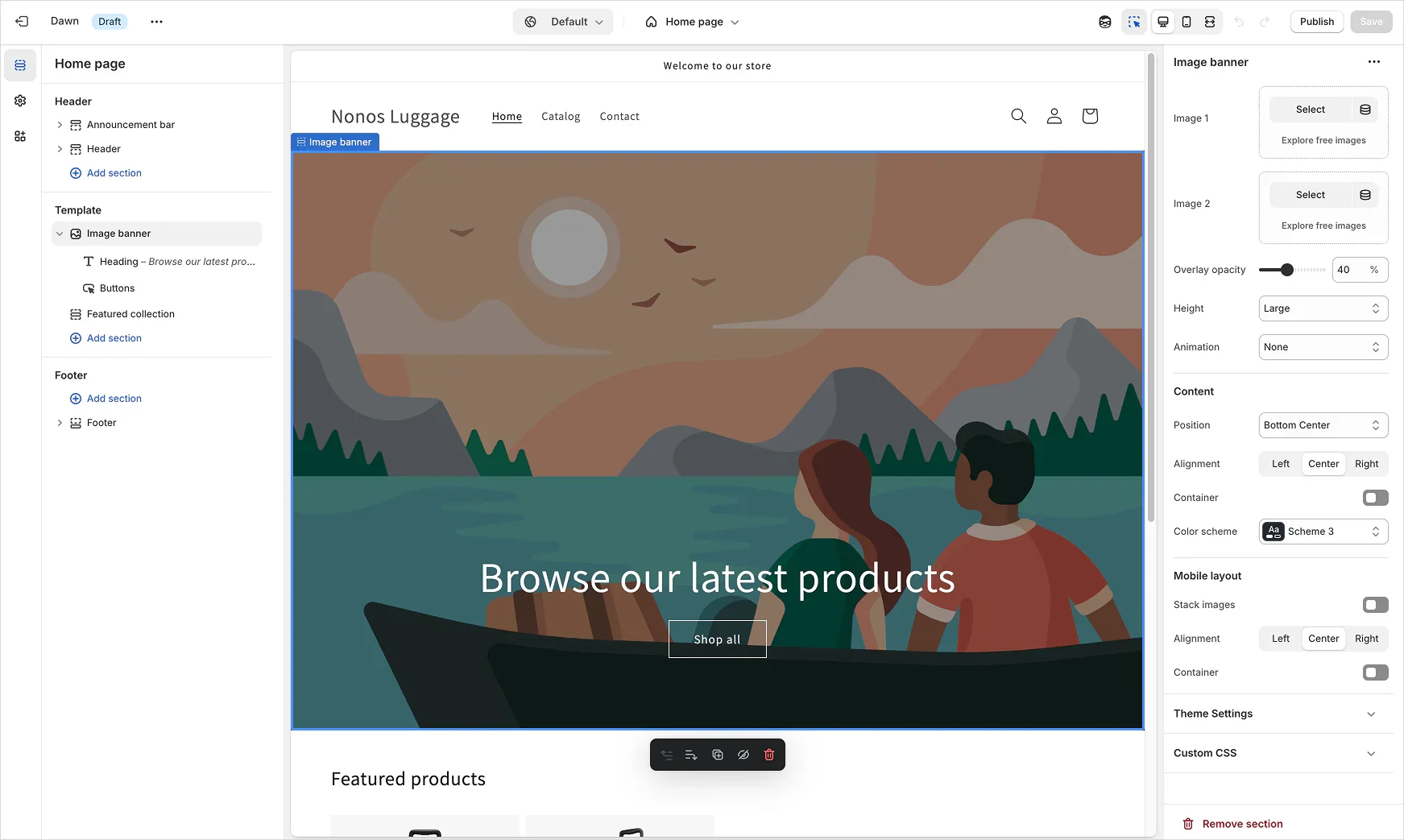
Your theme still sets the structure those blocks fit into. Sections and blocks let you rearrange content and adjust the controls your theme provides. This suits founders who want AI help alongside a structured visual editor; a purchase flow or layout outside those controls may need code changes or a separate storefront.
Shopify handles subscriptions through an app. For this comparison, we use Recharge, which adds customer subscription management, failed-payment recovery, cancellation-prevention tools and subscription analytics. You build the storefront with Shopify's AI and theme tools, while Recharge manages the subscription experience.
Simpler recurring offers may work with the free Shopify Subscriptions app. It supports skips, pauses, cancellation and payment updates, but does not support bundles. The cost example below uses Recharge Starter; its monthly and transaction fees are additional to Shopify and card processing.
Choose Shopify when you already have a store there or need its broader commerce tools. Try its native design tools before paying for another builder or planning a migration.
Lovable for an independent custom storefront
Lovable lets you build a custom storefront and connect it to a compatible commerce platform of your choice.
Start by describing the pages, visual direction, and shopping experience you want, then refine the result in chat. The storefront is a separate project from the system that manages subscriptions, products and orders.
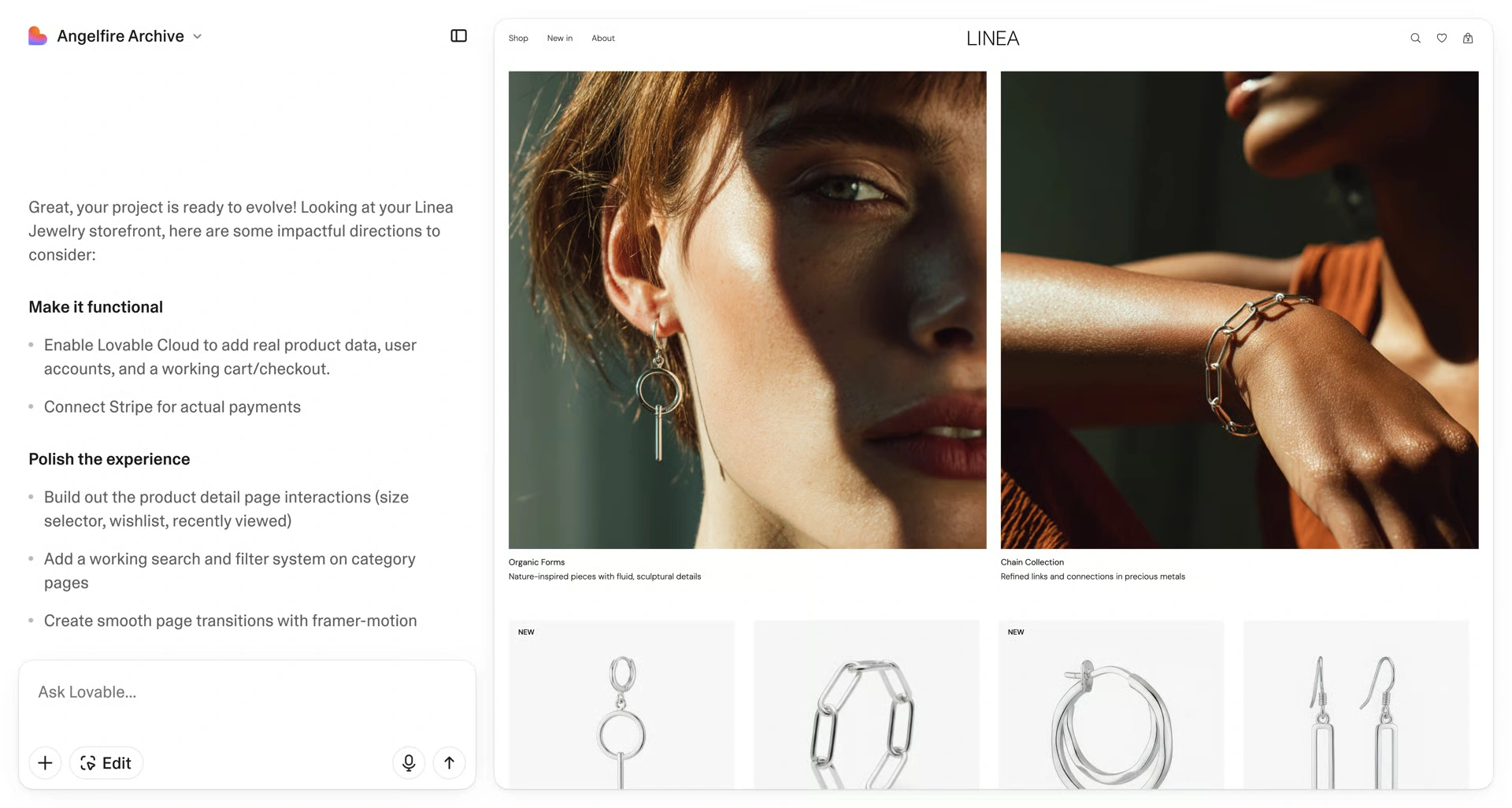
Its design guidance can help establish colors, typography and layout before building. If you haven't settled on a look yet, Lovable can present swatches, font samples and layout options. If your prompt is already specific, it can build directly. That gives you a way to shape the first version before polishing individual pages.
For later changes, the preview toolbar lets you select an element and describe an update, edit text inline, or draw an annotation to show a layout change. You could point at the coffee club's hero, request a different arrangement and refine the headline without describing the whole page again. Prompted design changes use build credits.
For subscriptions, the commerce connection still needs its own setup. Lovable has a documented Shopify integration. Other backends can use API connections, subject to the platform's capabilities and implementation work; choosing a platform does not make every subscription flow ready-made. The cost example below selects Shopify and Recharge for one specific route.
For membership or subscription apps, Lovable also offers built-in payments, with plan and backend requirements, or an integration with your own Stripe account. That Stripe subscription route requires customer accounts and a link to payment management.
For physical goods, your chosen backend must also handle inventory, renewal orders and delivery. Decide who will maintain those connections as the storefront changes.
Choose Lovable when you want a separate custom storefront with control over its design and commerce backend, and are prepared to maintain the connection between them. It suits founders whose storefront ideas justify a separate build and ongoing upkeep.
Wix for straightforward physical subscriptions
Wix Harmony combines conversation with hands-on visual editing. Aria can create and organize pages, sections and layouts, update your site's colors and fonts, and generate or refine text and images. You can share files and images in chat to give the request more context.
For a targeted change, select an element and tag it in the chat. Ask Aria to rework a hero or add a seasonal-roast section, then use the editor to adjust the result manually. The contextual Ask Aria tools can also suggest new section layouts or fix spacing. This suits founders who want to move between describing a change and adjusting it directly.
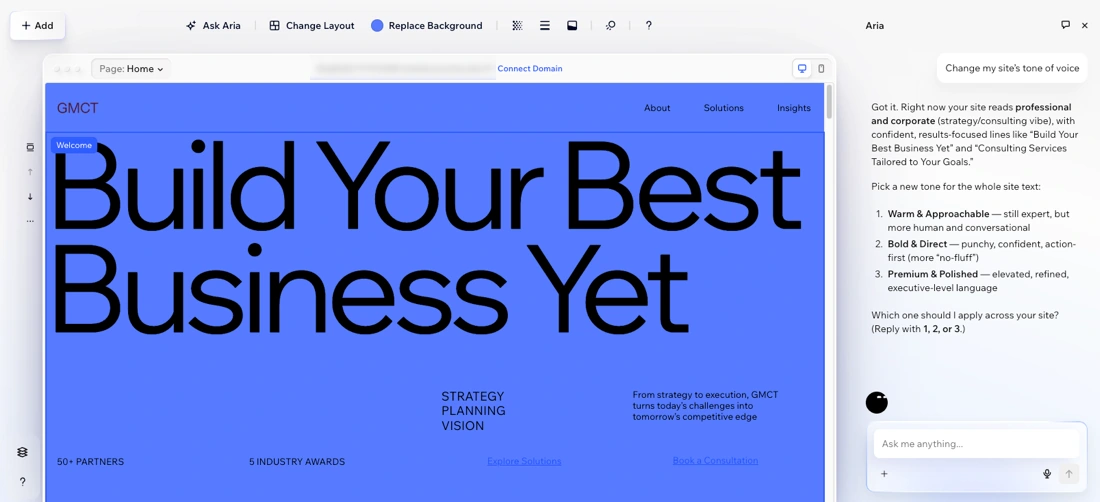
That combination suits a site with several jobs, such as a coffee subscription alongside educational content or service pages. Aria currently makes changes to the desktop version only, so mobile layout adjustments remain manual. Check the mobile view after changing a section, especially when an image and subscription button need to stay prominent.
Wix Stores handles physical-product subscriptions, taking recurring payments and creating renewal orders to fulfill. Customer skips are available when you enable them, with limits and cutoff settings.
A monthly coffee delivery can fit this setup well. If a customer also buys a one-time gift mug in their first order, check how Wix handles shipping on subscription orders. The mixed order's shipping charge carries into future subscription cycles.
This Stores route covers physical products. For recurring services or content access, use the separate Pricing Plans route.
Choose Wix when you want conversational design help and hands-on visual control for a mixed-purpose site. Its recurring-product and shipping rules should fit the offer you intend to sell.
Squarespace for a content-led business with recurring sales
Blueprint AI builds a custom site template through guided business and style choices. It generates text and images and selects style settings for the starting site. This gives a coffee brand a coordinated starting point to develop, rather than requiring it to specify every layout decision in an open-ended prompt.
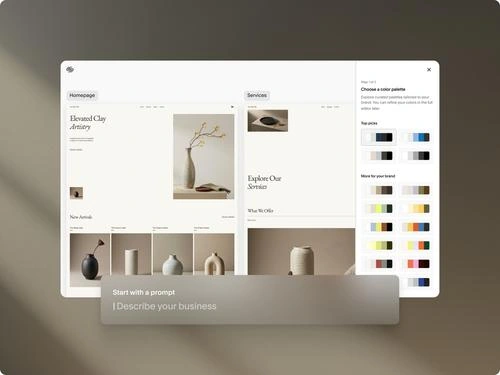
After generation, use Squarespace's visual editor to shape the pages. In Fluid Engine sections, you can position and resize blocks on a grid. Arrange a product image, tasting notes and button, then adjust the mobile layout separately. Content edits still affect both views, while layout placement can differ.
For later chat-based changes, Clarkson can update page text, images and site styles, as well as products and discounts. It is rolling out in waves, so the chat workflow depends on availability for your site.
The combination suits a content-led brand that wants guided creation and direct page editing. On version 7.1, physical or service products can have one-time or subscription purchase options.
The main constraint is the recurring purchase flow. Customers can buy one subscription product per transaction and cannot include other product types. They cannot skip renewals themselves, although a merchant can delay the next renewal. Payments use Squarespace Payments or Stripe.
Choose Squarespace when its content and design workflow fits and those subscription limits are acceptable. For a paid library or course, evaluate its separate content and membership workflow.
Another option: Hostinger offers native recurring billing in AI Builder agentic mode through Hostinger Ecommerce. Manual mode uses an external payment-link workaround instead. If you plan to ship subscription boxes, check the physical renewal and fulfillment flow as well as the recurring payment.
Can you build a subscription store with ChatGPT or Claude?
Yes. ChatGPT and Claude can help design and build a complete site, including its layouts, content and code. For a subscription business, you also need a system for products, checkout, recurring billing and subscriber records.
One route is a WordPress site with WooCommerce and a subscription extension. Another is a custom storefront connected to Shopify.
You can also use Subbly behind a custom storefront. A coding assistant can build the site with Subbly's developer tools. An assistant connected through Subbly MCP can help with supported product, plan, order and customer tasks. MCP connects the assistant to store tools; it does not currently edit pages in Subbly's own website builder.
For help preparing product copy and a storefront brief, follow our ChatGPT and Claude ecommerce guide.
With a custom setup, decide who will handle hosting, software updates, security and fixes when a connection changes. For physical goods, renewal orders must also reach fulfillment. Those responsibilities can add work and cost beyond generating the site.
For the connected options and what they can do, see which ecommerce platforms you can manage with AI agents.
What happens when you want to change the store?
Say the coffee club wants a new hero layout and a section promoting a seasonal roast. The first job is visual: show the coffee, explain the offer and make the subscription button easy to find. Here is how you would approach that change using the documented building tools:
- On Subbly, describe the new hero and seasonal section in chat, then select or annotate an element for a targeted adjustment. Review mobile separately and request changes for that view where needed. The agent can also create the product in Subbly when the roast needs its own offer.
- On Shopify, use the theme editor to rearrange supported sections or ask Sidekick for a seasonal-roast block. Request editable image and button settings, then adjust those controls and preview both device views. A new subscription product is configured in Shopify and Recharge.
- With Lovable, describe the new layout, then select or annotate the part of the preview you want refined. Keep the button connected to the chosen commerce backend. In our Shopify example, configure the offer in Shopify and Recharge and update the roast's checkout link.
- On Wix, ask Aria for the layout change, tag an element for a specific edit and fine-tune the result in the visual editor. Adjust the mobile layout manually afterward.
- On Squarespace, arrange the seasonal content in Fluid Engine and check its mobile layout. Where Clarkson is available, use chat for supported text, image and style updates.
If the roast has a new recurring price, review its product and billing settings as well as its presentation. Follow the subscription button through checkout to confirm the intended product, amount and frequency. Keep changes for new buyers separate from changes to existing subscribers' contracts.
For day-to-day work, the available agent tools may also help with products, coupons, stock or order records. Keep those capabilities in view when choosing the builder, rather than evaluating only its first homepage.
Before publishing a substantial design change, check the preview and undo or restore options your setup supports. Identify who will fix the pages, subscription app or connection: support for one part may not cover another. Shopify, for example, excludes troubleshooting AI-generated block code from its standard support and points merchants to a Shopify Partner when help is needed.
A custom site still needs an owner for updates, mobile checks and fixes to its connections. Include that responsibility in your budget.
To build and refine on Subbly, follow our AI subscription-store walkthrough.
What will it cost to build and run the store?
Imagine a coffee subscription club with two roasts to choose from at signup, each delivered monthly. It needs a homepage, a subscription product page and an About/FAQ page.
Once 100 customers make one $30 payment each month, it collects $3,000 across 100 transactions. The club wants customers to manage their subscriptions, update payment details and skip a delivery. It also wants to recover failed payments and offer a reason to stay when someone cancels.
Compare two budgets: building the store before launch, and the software and payment fees once those customers subscribe.
This is a fixed monthly delivery, without a build-your-own box or digital membership. The cheaper Wix and Squarespace routes below cover recurring selling with the limitations explained after the table.
Before launch: building the coffee store
Subbly publishes an estimate of $100–$250 in credits for the first version of a whole store, including checkout. It also gives $10–$50 for a page and $0.10–$1 for small edits.
These are indicative usage ranges that vary with complexity. Included credits can cover some of that work, so the credit value is not automatically an extra cash bill.
With Shopify's native tools, Wix or Squarespace, use the AI creation tools available with the selected website plan. Add any paid theme, extra AI usage or specialist work your design requires. A generated starting point and a finished store can involve different amounts of work.
For the custom Lovable route, this example selects Pro at $25 a month with 100 monthly credits, plus Shopify and Recharge. Building and later revisions use credits; extra usage and integration work can raise the launch budget. The monthly plans are included in the table below.
Monthly costs at 100 payments
These USD monthly-billing references were checked November 17, 2026, with no introductory discounts or additional sales tax or shipping collected.
Every total includes $117 in estimated card-processing fees for 100 standard US domestic card payments of $30, using 2.9% + $0.30. Actual rates vary by provider, country, and card type.
The selected providers are Stripe for Subbly, Shopify Payments for both Shopify configurations, Wix Payments, and Squarespace Payments. Extra AI usage, design or integration work, domains, taxes and optional services are outside the table.
|
Route |
Plans/mo |
Platform fees |
Monthly total incl. card fees |
|---|---|---|---|
|
Subbly + Stripe |
$79 |
$49 |
$245 |
|
$188 |
$65 |
$370 |
|
|
$213 |
$65 |
$395 |
|
|
Wix Core + Stores subscriptions |
$36 |
$0 |
$153 |
|
Squarespace Core + product subscriptions |
$39 |
$0 |
$156 |
Subbly: its additional platform fees are $30 from 1% of $3,000 plus $19 from 100 payments at $0.19. The fixed fee applies per payment, rather than per subscriber record. Max's $199 plan makes the same processing-inclusive total $365, with custom checkout/portal access conditions still applying.
Shopify + Recharge: the $188 covers Basic at $39 and Recharge Starter at $149. Recharge's fees add $65: 1.50% of $3,000 plus $0.20 on 100 payments. Shopify Payments avoids Shopify's additional third-party gateway fee. Simpler requirements may suit the free first-party subscription app or lower-cost paid apps.
Lovable + Shopify + Recharge: the extra $25 is Pro. This illustration uses direct links to Shopify checkout and Recharge's hosted customer portal. It is a route to implement and verify, not a turnkey integration. Recharge's own Storefront API and JavaScript SDK are on Scale; scope a custom cart or portal separately.
Wix: Core's $36 is a published monthly reference, with no additional platform transaction fee. Grace-period payment retries are available. Check that the customer controls fit your club, including what happens when a customer tries to cancel.
Squarespace: Core has 0% physical-commerce transaction fees, but customers cannot skip renewals themselves. Its price and Wix's cover simpler subscription setups with fewer retention tools than Recharge. Digital-content fees are separate.
If the club adds build-a-box, Recharge Scale is $499 plus 1.25% + $0.20 per transaction. With Shopify Basic and the same payments, the total is $712.50 a month, before extras. Compare each platform's box choices and renewal orders for that expanded offer.
Use the monthly total alongside the design workflow, subscription controls and maintenance each route requires. The lowest software bill may come with a different experience for you and your subscribers.
Choose the builder you can keep building with
Before committing, take your strongest option from a sample page through to a working subscription. Use these four checks:
- Build and refine the pages. Use your brand and offer, then change a meaningful part of the layout. Review desktop and mobile, including the route from the subscription button to checkout.
- Configure and test the recurring offer. Set the product, price, billing frequency, shipping, tax and payment options in the commerce platform and any subscription app. Use the available test tools to follow checkout and confirm the correct offer reaches the store.
- Check the subscriber and fulfillment experience. Review account access, payment updates and the skip or cancellation controls your offer promises. Where supported, test a renewal and confirm it creates the correct order for fulfillment.
- Work out the total cost and who will maintain the store. Include the plan, apps, usage and setup work. Agree who will handle later edits, connection failures and support requests, and check the options for restoring a working design.
Choose around the work you want to own. Shopify suits merchants invested in its commerce system; Lovable suits a separate custom storefront connected to a chosen backend. Wix and Squarespace can fit broader sites with simpler recurring-selling needs.
For a business built around subscriptions, Subbly brings the creation workflow and recurring commerce into the same platform. Bring your brand, your product and the experience you want subscribers to have.
Build your subscription store with your Subbly agent.
For the wider launch process, follow our subscription website setup guide.


Subbly – the purpose built platform for starting and growing subscription businesses