10 Best Subscription Ecommerce Platforms for 2026
Choosing the right platform is crucial if you want to build a successful subscription business. Read this guide to find out what you should be looking for to find the best subscription ecommerce platform for your unique needs.

The best subscription ecommerce platform depends on what you sell, how central subscriptions are to your business and how much of the customer journey you want one system to manage.
Subbly is our best all-in-one option for subscription-first businesses.
Shopify has a broader ecommerce ecosystem, WooCommerce provides more technical control and platforms such as Podia, Recharge and Crystallize serve specialized needs.
The list is organized by best fit, not as a universal ranking. Use the platform type and main tradeoff to create a shortlist, then test it with the evaluation checklist.
| Platform | Best for | Platform type | Subscription support | Extra software | Starting pricing structure | Main tradeoff |
|---|---|---|---|---|---|---|
| Subbly | Subscription-first businesses | Complete subscription-first platform | Built in | None for core subscription commerce | Subbly: $69/month, billed monthly | Higher usage limits and additional service require higher plans |
| Shopify | Brands that value a broad ecommerce ecosystem | General ecommerce platform | Free first-party or third-party app | Subscription app required | $39 monthly or $29 monthly with annual billing | Capabilities and costs depend on the selected app |
| WooCommerce | WordPress flexibility and technical control | Self-hosted ecommerce platform | Paid extension | Hosting, maintenance and extension | Core plugin free; WooCommerce Subscriptions costs $279 yearly | Greater technical and maintenance responsibility |
| BigCommerce | Established multichannel brands | General ecommerce platform | Third-party integration | Subscription app required | From $39 monthly or $29 monthly with annual billing | Subscription operations depend on another vendor |
| Wix | Simple physical-product subscriptions | Hosted website builder | Built in for supported physical products | None for the supported use case | From $29 monthly with annual billing | Limited customer self-service and migration flexibility |
| Squarespace | Design-led physical or service subscriptions | Hosted website builder | Built in for supported products | None for the supported use case | Varies by location and billing cycle | Narrower subscription and payment flexibility |
| Cratejoy | Subscription-box marketplace discovery | Subscription-box storefront and marketplace | Built in | None for core box subscriptions | From $24.99 monthly for marketplace selling | Marketplace referral fees apply to renewals |
| Podia | Courses, communities and digital memberships | Digital creator platform | Built in | None for supported digital subscriptions | From $42 monthly with annual billing | Not designed for physical subscription operations |
| Recharge | Established Shopify brands | Subscription add-on | Built into the add-on | Shopify or a developer-built store | From $99 monthly plus transaction fees | Not a standalone storefront |
| Crystallize | Developer-built subscription stores | Platform for a custom store | Built in | Storefront and connections built by developers | Free tier with metered usage | Requires significant development work |
Prices shown are starting points in US dollars and were checked on August 31, 2026. Payment processing, transaction fees, integrations, setup and other required software may increase the total cost.
What counts as a subscription ecommerce platform?
“Subscription ecommerce platform” can describe products that do very different jobs.
A complete platform can provide the storefront, checkout, recurring billing, subscriber accounts and order management. A general ecommerce platform may need an app or extension to sell subscriptions.
Other products have narrower roles. Cratejoy combines subscription-box tools with a marketplace. Podia focuses on digital products and communities. Recharge adds subscription tools to an existing store. Crystallize gives developers the building blocks for a fully custom store.
They belong in the same comparison because each helps businesses sell an offer repeatedly and manage the relationship between payments.
That ongoing relationship separates subscription commerce from simply accepting repeat payments. The platform may need to handle skips, pauses, plan changes, failed payments, repeat orders, delivery and data exports.
Our subscription management software guide covers these requirements in more detail.
How we evaluated the platforms
Subbly publishes this comparison and is also one of the platforms evaluated.
We included all-in-one subscription platforms, general ecommerce platforms, specialist marketplaces, creator platforms, add-on subscription tools and developer-built systems. These are the main options businesses compare when choosing how to run subscriptions.
We assessed each option against the same decision criteria:
- Fit for physical products, digital products, services and mixed catalogs
- Whether subscription support is built in or requires additional software
- Customer self-service for account changes, skips, pauses and cancellations
- Failed-payment recovery
- Recurring-order management
- Total cost, including any required apps or services
- What data can be exported and whether active subscriptions can be moved
- How much setup and maintenance the merchant must handle
- Best-fit use case
We did not award a universal score. The right choice depends on the business and its existing setup.
Claims about product features, pricing, support, developer tools and migration were checked against official provider sources on August 31, 2026. Customer stories are used only as attributed examples. Verify any price or capability that could materially change your decision.
The 10 best subscription ecommerce platforms for 2026
1. Subbly: best all-in-one platform for subscription-first businesses
Best for: Businesses that treat subscriptions as central and want their storefront, checkout and subscription operations in one system
Platform type: Complete subscription-first ecommerce platform
Extra software required: None for core subscription commerce
Subbly is a hosted ecommerce platform for businesses selling physical products, digital products, memberships and services by subscription. It also supports one-time purchases and upsells.
Its AI website builder lets merchants create and customize a subscription storefront without using a separate website platform.
The main advantage is that selling and managing the subscription relationship happen in the same integrated system. Customers can update payment details, switch plans, pause, skip, resume or cancel through the portal. Subbly also includes failed-payment retries.
It does not hold your core business data hostage: orders, customers, subscriptions, invoices and transactions can be exported as CSV files if you decide to migrate.
Strengths: Subbly does not require a separate website platform or subscription app for core subscription commerce. Its website builder, checkout, customer portal, recurring billing, order management and retention tools work together.
This means fewer tools to connect. It also makes it clearer where renewals, subscriber changes and subscription orders are managed.
Limitations: Subbly does not provide product sourcing, packaging or fulfillment. Merchants must handle these functions or connect an external service.
Subbly and Max share the same platform features. Max adds agent usage and higher team, automation and inventory limits; Subbly X adds service and custom capacity. Platform transaction fees vary by plan and payment provider.
Pricing: The Subbly plan costs $69 per month when billed monthly. Payment processing and applicable platform transaction fees are additional. Subbly pricing checked October 9, 2026.
Verdict: Subbly is the strongest fit for a subscription-first business that wants to sell and manage subscriptions in one platform.
Use the trial to build a real offer with the AI website builder and test the workflow before committing.
2. Shopify: best for brands that value a broad ecommerce ecosystem
Best for: Brands that want strong general ecommerce capabilities, a large app ecosystem and support for multiple sales channels
Platform type: General ecommerce platform with a subscription app
Extra software required: A free first-party or paid third-party subscription app
Shopify is a hosted platform for online stores, point-of-sale transactions, social commerce and marketplace selling.
Subscriptions require the free first-party Shopify Subscriptions app or a third-party alternative.
The first-party app lets customers update payment and shipping details, skip orders, pause, resume or cancel. Merchants can configure failed-payment retry attempts, the interval between attempts and what happens after the final attempt.
Strengths: Shopify offers an extensive ecosystem of themes, apps, integrations, agencies and developers. It suits established retail brands adding subscriptions to a wider ecommerce operation.
Merchants can start with Shopify’s free app and move to a specialist provider for more advanced retention, bundling or customer-management tools.
Limitations: The selected subscription app becomes part of the store’s cost and setup. Features, subscriber data and migration requirements vary between apps.
Shopify Subscriptions does not support bundles or draft orders. More complex offers may require a paid app.
Moving active subscriptions may involve separate steps for customer and product records, saved payment details and subscription plans.
Pricing: Basic costs $39 per month or $29 per month with annual billing. The first-party Shopify Subscriptions app is free. Third-party app charges, payment processing and any applicable third-party payment provider fees are additional. Pricing checked August 31, 2026.
Verdict: Shopify is a strong choice for brands adding subscriptions to an established retail business. Subscription-first startups should compare the full app-based setup with a platform that handles subscriptions directly. See our Shopify and Subbly comparison.
3. WooCommerce: best for WordPress flexibility and technical control
Best for: Businesses that already use WordPress and want extensive control over their store and data
Platform type: Self-hosted ecommerce platform with a paid subscription extension
Extra software required: Web hosting and WooCommerce Subscriptions
WooCommerce is an open-source ecommerce plugin for WordPress. Subscriptions require the paid WooCommerce Subscriptions extension.
The extension supports physical, virtual and downloadable subscriptions, trials, sign-up fees and multiple billing schedules. Customers can update account details and cancel. Merchants can also enable suspension and plan switching.
Strengths: WooCommerce gives merchants substantial control over their website, data and choice of tools. It suits teams with WordPress experience, developer support or needs that do not fit a managed platform.
Limitations: Merchants are responsible for hosting, security, backups, updates and making sure plugins work together. Failed-payment retries are disabled by default and depend on the payment provider.
Moving active subscriptions requires customer, product, order and payment records to stay correctly linked. Whether saved payment details can move depends on the payment provider.
Pricing: The core plugin is free, while WooCommerce Subscriptions costs $279 per year. Hosting, domains, processing, development and additional extensions must be included in the total cost. Pricing checked August 31, 2026.
Verdict: WooCommerce suits technical teams that value ownership and customization. Businesses without WordPress expertise should budget for maintenance as well as the subscription extension. See our WooCommerce and Subbly comparison.
4. BigCommerce: best for established multichannel brands
Best for: Established retailers that need strong general ecommerce, multichannel selling and a flexible choice of tools
Platform type: General ecommerce platform with third-party subscription integrations
Extra software required: A recurring-billing or subscription app
BigCommerce provides hosted ecommerce for online stores, multiple storefronts, point-of-sale integrations and marketplaces. Subscriptions require a third-party app.
The app determines plan changes, customer self-service, failed-payment recovery and subscription reporting. Evaluate the app separately from BigCommerce.
Strengths: BigCommerce supports several sales channels and complex product catalogs. Customers, products and orders can be transferred by spreadsheet or through developer tools.
Limitations: Subscription records, saved payment details and migration steps may be split across BigCommerce, the app and the payment provider.
BigCommerce can move stores to a higher plan as sales grow. Include future plan changes, app prices and payment fees when comparing costs.
Pricing: Core costs $39 per month or $29 per month with annual billing and covers up to $30,000 in trailing-12-month GMV. Subscription-app and processing fees are additional.
On Core, eligible orders handled by an Open Payment Provider carry a 2% BigCommerce fee. Listed Embedded Payment Providers do not. Pricing checked August 31, 2026.
Verdict: BigCommerce suits established retailers adding subscriptions across several sales channels. It is less direct for a startup that wants to manage subscriptions in one system. See our BigCommerce and Subbly comparison.
5. Wix: best for simple physical-product subscriptions
Best for: Small businesses that want a no-code website and a straightforward physical-product subscription
Platform type: Hosted website builder with built-in product subscriptions
Extra software required: None for supported physical-product subscriptions
Wix lets merchants sell physical products by subscription or as one-time purchases. Billing can follow daily, monthly or yearly intervals, with a new fulfillment order created each period.
Customers can cancel and update payment details. Merchants must handle skips, shipping changes and renewal-date adjustments.
Strengths: Wix combines no-code site building, hosting, checkout and subscription orders. It is practical for a small business with a simple offer and limited technical resources.
Limitations: Wix Stores does not support digital-product subscriptions. Customer self-service is narrower than on a subscription-first platform.
Changes to an offer apply only to new purchases. Switching payment providers requires merchants to cancel active subscriptions and ask customers to subscribe again.
Pricing: The Core plan starts at $29 per month with annual billing and includes basic ecommerce. Payment processing fees are additional. Pricing checked August 31, 2026.
Verdict: Wix works for simple physical-product subscriptions where setup matters more than flexible controls or migration. Digital products and more complex subscriptions need a specialist platform. See our Wix and Subbly comparison.
6. Squarespace: best for design-led physical or service subscriptions
Best for: Visually driven businesses selling straightforward physical or service subscriptions
Platform type: Hosted website builder with built-in subscription products
Extra software required: None for supported subscription products
Squarespace combines polished templates with built-in commerce. Eligible physical and service products can be sold by subscription or as one-time purchases.
Subscription purchases require a customer account. Customers can update billing information. Squarespace retries failed payments twice at five-day intervals, then cancels the subscription after a third failure.
Strengths: Squarespace offers a managed, design-focused route to selling simple subscriptions. Hosting, website editing, checkout and order management stay together.
Limitations: Product subscriptions do not support downloads. Squarespace has a separate system for paid digital content and memberships. Product subscriptions require Squarespace Payments or Stripe and cannot use PayPal, Apple Pay or ACH.
Subscriber controls are relatively narrow. Migrating from another service may also require customers to subscribe again if payment details cannot be imported.
Pricing: Subscription products are available on Squarespace’s current website plans. The Basic plan charges a 2% commerce transaction fee, while Core, Plus and Advanced do not. US Squarespace Payments processing starts at 2.9% plus $0.30 on Basic and Core.
Base plan prices vary by location and billing cycle, so check the live Squarespace pricing page. Pricing and fees checked August 31, 2026.
Verdict: Squarespace works when presentation and ease of use matter more than advanced subscriber controls. Complex plan changes or migrations may outgrow its tools. See our Squarespace and Subbly comparison.
7. Cratejoy: best for subscription-box marketplace discovery
Best for: Subscription box businesses that want a dedicated marketplace and subscription-order tools
Platform type: Subscription-box storefront and marketplace
Extra software required: None for core subscription-box selling
Cratejoy is built for subscription boxes. Its main differentiator is a marketplace that the company reports receives four million page views and more than 30,000 sales each month.
The platform includes recurring billing, gift options and box-oriented renewal and shipping workflows. Subscribers can cancel, reactivate and skip renewals. Customer and subscription data can be exported to CSV.
Strengths: Cratejoy gives box businesses a discovery channel that other platforms in this comparison lack. It connects marketplace sales with subscription and shipment management.
Limitations: Referral fees apply to the first order and later renewals, reducing the lifetime profitability of marketplace customers.
Advanced failed-payment recovery also requires the Advanced website plan.
Pricing: A marketplace-only account starts at $24.99 per month, plus 1.25% and $0.10 per transaction. Marketplace sales carry a 15% referral fee on the full order, including renewals. Payment processing fees are additional.
The all-in-one website plan starts at $59 per month when paid yearly with the same platform transaction fee. The Advanced plan, which includes advanced failed-payment recovery, starts at $159 per month paid yearly. Pricing checked August 31, 2026.
Verdict: Cratejoy is most compelling when marketplace exposure is central to acquisition. Compare its reach and ongoing referral fees with the value of building demand through owned channels. See our Cratejoy and Subbly comparison.
8. Podia: best for courses, communities and digital memberships
Best for: Creators selling subscription access to courses, communities or other digital products
Platform type: Digital creator commerce platform
Extra software required: None for supported digital subscriptions
Podia combines a website and checkout with tools for courses, downloads, coaching, events, email and communities. Creators can sell monthly or annual access, trials and payment plans.
Customers can manage active subscriptions. Merchants can end access immediately or after the billing cycle and switch between monthly and annual billing.
For Stripe payments, Stripe controls the retry schedule through its Smart Retries settings.
Strengths: Podia brings the main parts of a digital creator business into one platform. A simple membership does not need a separate course host, community tool, checkout and website.
Contacts and sales history can be exported to CSV. Paid plans include limited help migrating eligible courses, downloads and free community content.
Limitations: Podia is not designed for physical inventory, shipments or subscription-box operations. Subscriptions cannot be paused.
Podia has no public API or webhooks. Zapier is available on higher plans, but custom integrations remain limited.
Pricing: Mover costs $42 per month with annual billing and charges a 5% Podia transaction fee. Shaker costs $84 per month with annual billing and no Podia transaction fee. Stripe or PayPal processing fees are additional. Pricing checked August 31, 2026.
Verdict: Podia suits digital access and creator-led memberships. It is not a direct alternative for physical subscription businesses that need inventory, shipping and flexible order management.
9. Recharge: best subscription add-on for established Shopify brands
Best for: Established Shopify brands that want advanced subscription management without replacing their storefront
Platform type: Subscription management add-on
Extra software required: Shopify or a developer-built store
Recharge adds subscription billing and subscriber management to an existing store. It connects directly with Shopify, while developers can connect it to a custom store through its API.
The customer portal can let subscribers add or swap products, reschedule deliveries, pause, cancel or reactivate. Failed Payment Recovery uses smart retry timing and customer notifications.
Strengths: Recharge offers tools to reduce cancellations and win back customers, along with gifting, automated workflows and reporting. Higher plans add bundles and loyalty features.
Limitations: Recharge is not a storefront. You still need an ecommerce platform, delivery setup and any other required apps. This adds cost and more tools to manage.
Recharge can export customer, order and subscription records. Moving active subscriptions still depends on compatible payment methods and correctly matched customer, product and billing data.
Pricing: Starter costs $99 per month plus 1.49% and $0.19 per transaction. Plus costs $499 per month plus 1.34% and $0.19 per transaction. Ecommerce platform, payment processing and setup costs are additional. Pricing checked August 31, 2026.
Verdict: Recharge suits established Shopify brands that want advanced tools to keep subscribers. A new subscription-first business may prefer a platform that includes the storefront and subscription operations. See our Recharge and Subbly comparison.
10. Crystallize: best for developers building a custom subscription store
Best for: Technical teams that need a fully custom subscription setup
Platform type: Developer platform for a custom, headless store
Extra software required: A developer-built storefront, checkout, payment integration and customer experience
Crystallize provides subscription plans, contracts and repeat orders for custom-built stores. It supports physical and digital products with flat, quantity-based, usage-based or tiered pricing.
Crystallize does not provide a ready-made storefront. Developers use its APIs to connect a custom website with content, payments, business software and delivery systems.
Strengths: Crystallize offers substantial control over products, billing rules and customer experiences. It supports requirements such as usage-based services and custom B2B agreements.
Customers, orders and subscription contracts can be moved or updated in bulk. This is a developer-led migration, not a guided import for beginners.
Limitations: Crystallize is the technology behind a store, not a ready-made shop. Developers must build the buying journey, customer account, payments and day-to-day workflows.
Its documentation does not describe a turnkey customer portal or built-in payment-recovery workflow. Teams must define both before choosing the platform.
Pricing: Particle is free plus metered usage and includes 25 monthly orders before a $2.50 charge for each additional order. Atom costs $949 per month plus metering and includes 500 monthly orders before a $1 charge for each additional order. Payment-provider and development costs are separate. Pricing checked August 31, 2026.
Verdict: Crystallize suits developer-led businesses that need a fully custom store. It is excessive for most small teams seeking a fast, managed setup.
How to choose the right platform for your subscription business
The right platform should fit what you sell, support customers after they subscribe and remain manageable as the business grows.
Start with the business model and product type
Begin with what you sell and how each subscription order works. Different models create different practical needs.
| Business model | Requirements to test |
|---|---|
| Replenishment | Flexible delivery frequencies, inventory forecasting, address changes and easy skips |
| Curated subscription box | Product rotation, cutoff dates, customer preferences, packing and repeat deliveries |
| Membership or service | Access rules, member management and any booking requirements |
| Digital content | Automated access, content delivery and account management |
| Mixed catalog | Subscription and one-time products, mixed carts, upsells, tax and shared inventory |
Turn these requirements into non-negotiables before comparing products. This prevents attractive design or a low starting price from hiding a poor fit.
Still developing a physical box offer? Our guide to starting a subscription box business covers the launch process.
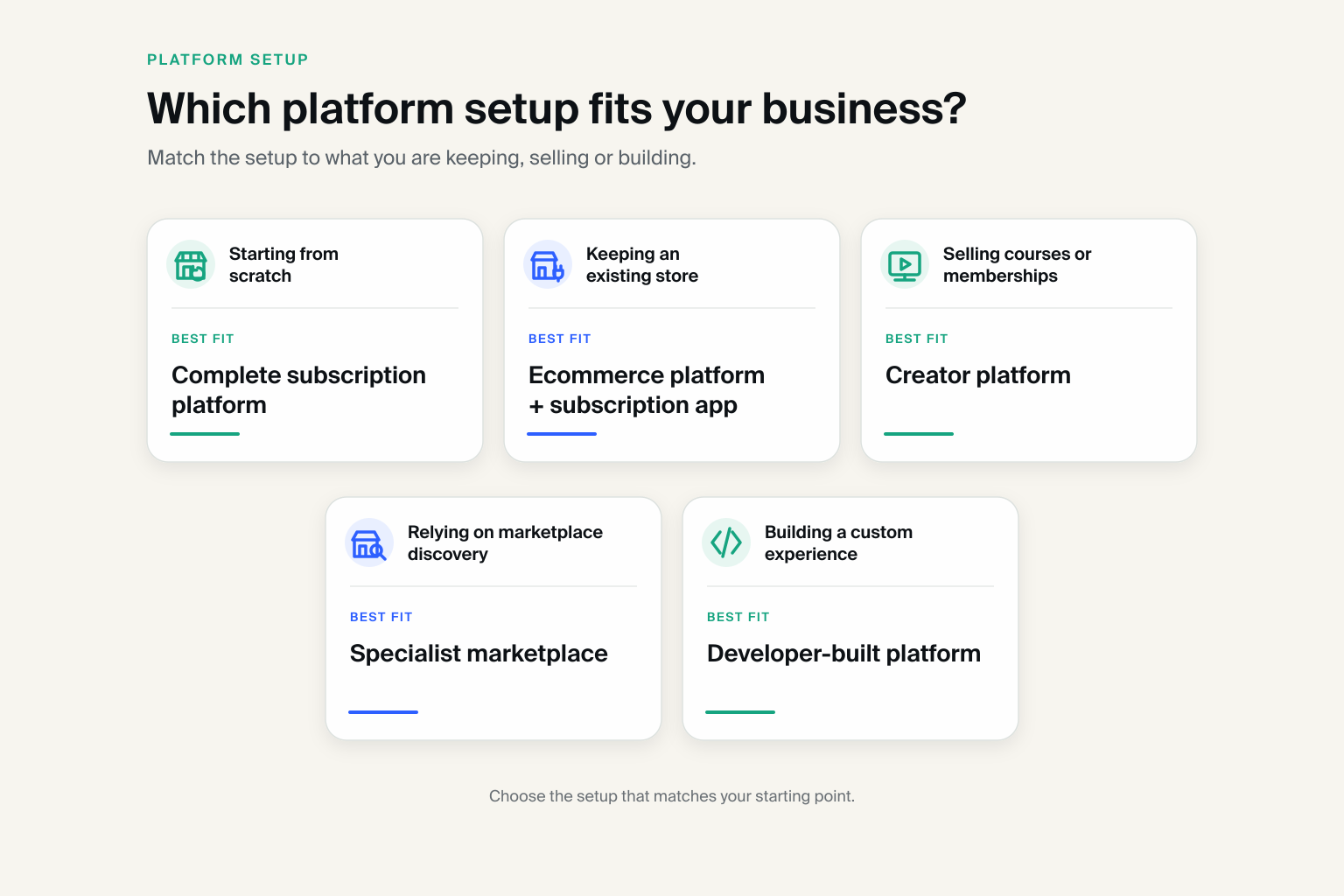
Decide whether you need one complete platform or an add-on
First decide whether one platform should run the whole store or whether you want to add subscription tools to an existing store.
Start here
- Starting from scratch with subscriptions at the center? Evaluate a complete subscription-first platform.
- Keeping an existing store? Compare its built-in tools with a dedicated subscription app.
- Selling courses, communities or digital memberships? Assess a creator platform built around access.
- Building a fully custom experience with developers? Consider a platform made for custom stores.
- Relying on discovery? Compare a specialist marketplace with an owned store.
A complete platform such as Subbly connects the storefront, checkout, recurring billing and subscriber management. An add-on may make more sense when you already have a store you want to keep.
Test what happens after someone subscribes
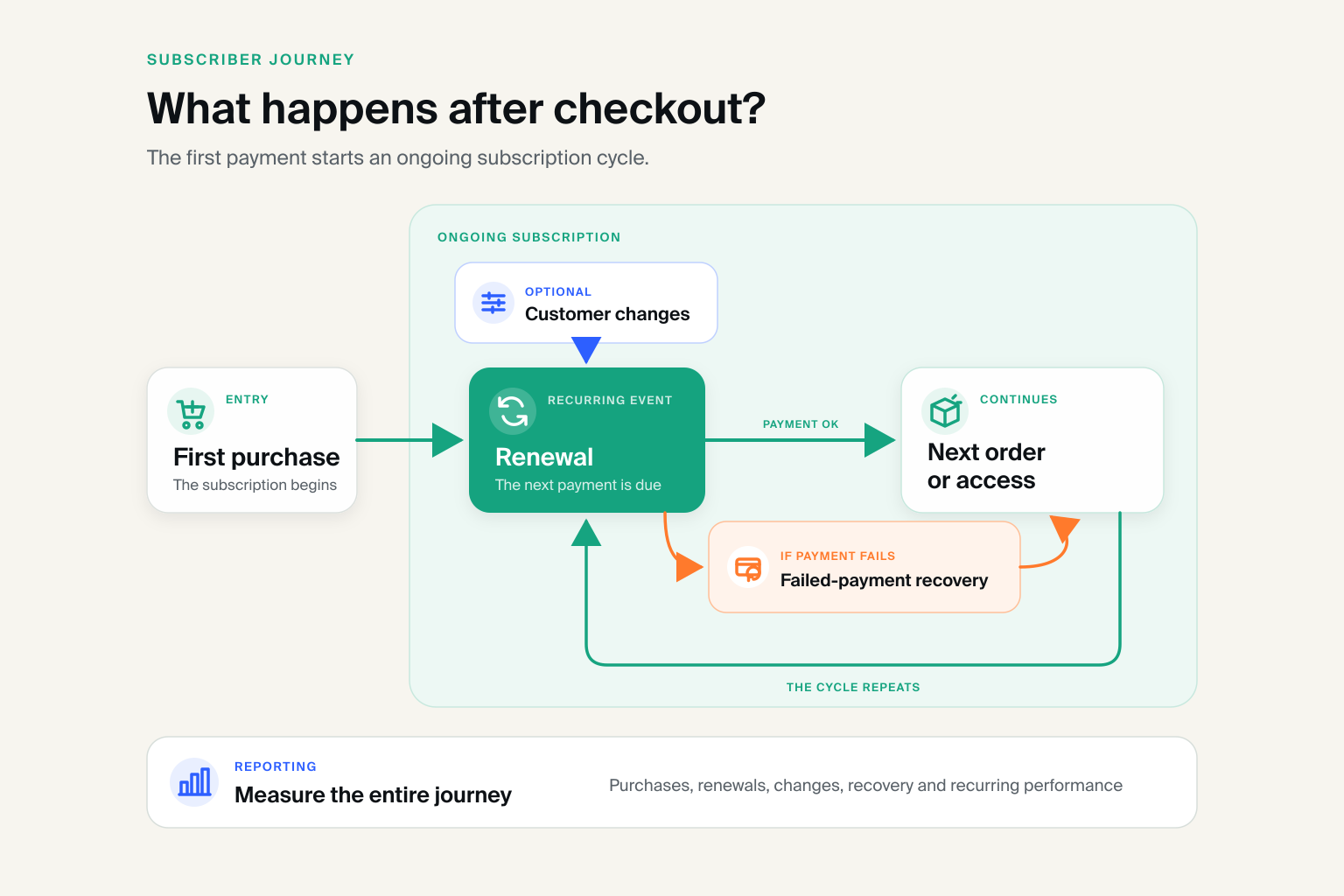
Do not stop at whether the platform can charge a card each month. Test purchases, renewals, customer changes, failed payments, recurring orders and reporting.
Every change a customer cannot make becomes work for the merchant. Failed-payment recovery also prevents avoidable subscriber loss.
Nail Mail reported cutting weekly subscription-management time from 40 hours to 20 after moving from Wix to Subbly. Its founder credited customer self-service, payment recovery and easier subscription operations.
This is one merchant’s experience, but it shows why the work after checkout matters when comparing platforms.
Calculate the complete cost
The headline price rarely represents the full cost. Compare each option over the same period, preferably 12 months.
Total subscription cost = ecommerce platform + subscription app or extension + transaction fees + payment processing + required connections + setup and maintenance
Use the same assumptions for every option. Include likely sales volume for percentage-based fees and only the paid apps your workflow requires.
| Cost category | Platform A | Platform B |
|---|---|---|
| Fixed platform costs | ||
| Subscription software | ||
| Transaction and processing fees | ||
| Required apps and connections | ||
| Setup or migration | ||
| Ongoing maintenance | ||
| Estimated first-year cost |
If Subbly is on your shortlist, check its current pricing. Use official pricing for every alternative.
Check migration and data exports before committing
Exporting customers and orders does not mean active subscriptions will move without disruption. Saved payment details may be held by the payment provider and require a supported transfer.
Ask each provider:
- Which customer, order, subscription, invoice and transaction records are exportable?
- Can saved payment details be transferred, and which payment providers are supported?
- Will subscribers need to enter their payment details again?
- What checks, downtime and switching work are required?
- Is migration support included, paid or entirely self-managed?
Get the answers in writing. If you are considering Subbly, review its migration guidance.
Shortlist, demo and test the real experience
Reduce the options to two or three, then test each with your real offer. A polished demo is no substitute for completing the tasks you and your customers will perform.
Subscription platform test checklist
- Create your real offer, including any size, color, frequency or plan choices.
- Complete a test checkout using your preferred payment option.
- Update payment and shipping information as a customer.
- Skip, pause, switch and cancel a subscription.
- Trigger or inspect the failed-payment workflow.
- Review the next recurring order before it processes.
- Test shipping, local pickup or digital access, where relevant.
- Check reporting, staff access and the help available during setup.
- Export customer, order and subscription data.
- Confirm how saved payment details would be handled during migration.
- Calculate the complete first-year cost.
Run the same test on every platform and record where extra software or manual work is required. Pre-launch readers can use our guide to creating a subscription website for the next step.
Frequently asked questions
What is a subscription ecommerce platform?
A subscription ecommerce platform helps businesses sell products or services repeatedly and manage the customer relationship. It may include the storefront, checkout, recurring billing, accounts and order management, or add subscription functions to another platform.
Which ecommerce platform is best for subscriptions?
The best platform depends on what you sell and whether you already have a store. Subbly suits subscription-first businesses that want the storefront and subscription operations together.
Shopify fits established ecommerce stores, while WooCommerce offers more control. Podia focuses on digital products, Cratejoy adds marketplace discovery, Recharge extends Shopify and Crystallize supports fully custom stores.
Can Shopify, WooCommerce, Wix or Squarespace sell subscriptions?
Yes. Shopify uses first-party or third-party apps. WooCommerce requires an extension. Wix and Squarespace support eligible subscription products natively. Product types, customer controls, payment recovery and migration still differ, so accepting repeat payments is not enough to choose the right platform.
What is the difference between a subscription platform and subscription billing software?
A subscription ecommerce platform presents the offer, completes the sale and manages customers and orders. Billing software focuses on scheduled charges, invoices and payments. It can be one part of the setup, but it is not necessarily a storefront or a tool for managing orders. Our subscription management software guide explains the distinction.
How much does a subscription ecommerce platform cost?
There is no single typical price. Options range from free software that requires hosting or development to managed platforms costing hundreds of dollars per month. Compare the complete cost: the platform, subscription software, transaction and processing fees, integrations, setup and maintenance. Use the cost worksheet above.
Choose the platform that fits the complete subscription journey
Your platform must support more than the initial sale. Test renewals, subscriber changes, failed payments, recurring orders, reporting and data access.
An established store, creator business, marketplace-led brand or developer-led project may need a subscription app or specialist platform. Account for the extra software, fees and day-to-day work.
If subscriptions are central and you want the storefront, checkout, recurring billing and subscriber management connected, Subbly is designed for the job. Build the real offer and test the customer journey before launching.


Subbly – the purpose built platform for starting and growing subscription businesses